

 Return
  Share
Share 
In European real estate development, online marketing almost always operates with a long sales cycle. A potential buyer may submit an inquiry today, attend a viewing weeks later, and make a purchase decision months after that.
At the same time, marketing sees clicks, leads, and CPL, while the sales team sees property viewings, reservations, and closed deals. When these data sets are not connected, decisions are made blindly: budgets are reallocated based on the number of leads rather than actual revenue.
End-to-end analytics makes it possible to connect the customer journey from advertising to the deal inside the CRM and understand which channels and campaigns truly generate revenue—and which only create the illusion of activity.
Importantly, this does not always require expensive analytics platforms. In many European developer projects, a standard stack is sufficient: GA4, Google Ads, Meta Ads, a CRM (HubSpot, Salesforce, or Pipedrive), and Looker Studio.
- what end-to-end analytics means in real estate development;
- which implementation options exist without complex platforms;
- the most common mistakes developers make;
- and which model makes the most sense in practice.
In this article, we’ll cover:
What end-to-end analytics means in development
End-to-end analytics answers one key business question:
which marketing investments lead to deals and revenue.
To do this, data must be connected across the entire chain:
- Source and campaign
(Google Ads, Meta Ads, TikTok, websites, email, etc.) - Online action
(form submission, chat, viewing request) - CRM stages
(qualified lead, viewing, reservation, deal) - Financial result
(deal value, revenue, ROI)
If you only see the first two points, that’s web analytics. End-to-end analytics begins where CRM data becomes part of marketing decision-making.
What’s needed before implementation
Before any integrations, it’s crucial to establish basic order. Without this, even the most expensive analytics won’t work.
- unified and mandatory UTM tags for ad campaigns;
- GA4 tracking codes and ad platform conversion tags (Google Ads, Meta Ads) installed on the website;
- storage of user and click parameters in the CRM (Google Client ID, Google Ads Click ID, Meta Ads Click ID);
- a clear CRM funnel without chaotic statuses;
- 3–6 key stages that realistically reflect the path to a deal.
Minimum checklist:
For HubSpot, Salesforce, and Pipedrive, this is especially important: analytics will only be as good as the structure of the sales funnel.
Three practical end-to-end analytics setups without complex platforms
Option 1. Sending offline conversions to ad platforms and GA4
This is the most practical approach and delivers the fastest impact.
When a manager changes a lead’s status in the CRM (for example, to Qualified or Visit), this event is sent to:
- Google Analytics 4
- Google Ads
- Meta Ads
As a result, ad algorithms start optimizing not for leads, but for quality.
Data transfer can be fully automated or start with manual CSV uploads as an MVP.
- ad campaigns learn from high-quality leads;
- the share of “empty” inquiries decreases;
- marketing begins to influence real sales, not just CPL.
Benefits:
Option 2. Looker Studio as a single analytics hub
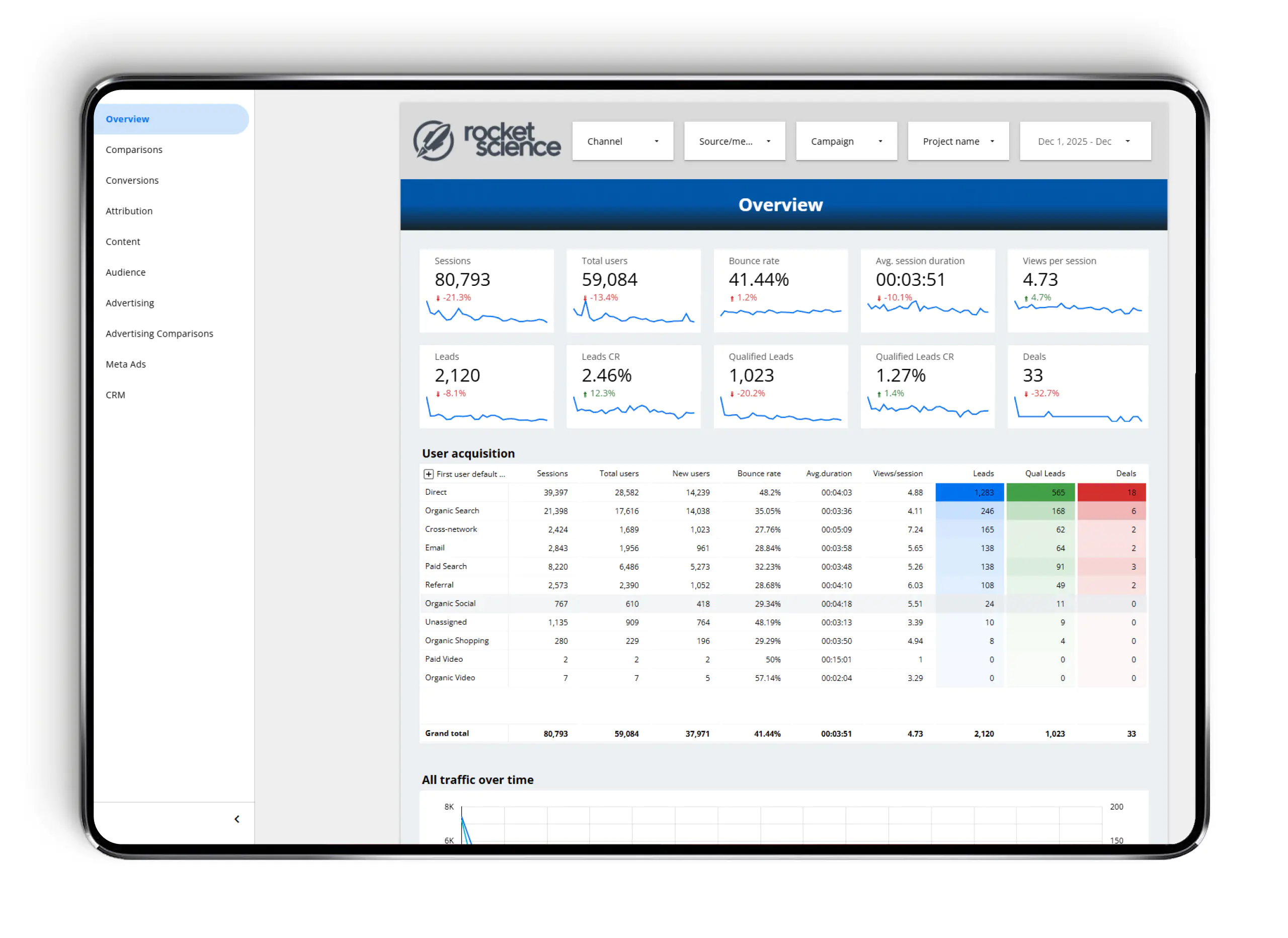
Looker Studio allows you to combine in one dashboard:
- traffic and events from GA4;
- spend and campaigns from Google Ads and Meta Ads;
- CRM data (statuses, deals, revenue).
Important: Looker Studio shows the picture, but it does not train ad algorithms. That’s why it’s best used together with Option 1.
Option 3. Analytics inside the CRM
HubSpot, Salesforce, and Pipedrive allow reporting directly within the system:
- by source and spend;
- by funnel;
- by revenue.
Large CRM systems have built-in connectors for ad accounts, which simplifies importing ad spend. An alternative is third-party integration services like Zapier.
This is a good option for sales teams and management control.
Common mistakes developers make when implementing end-to-end analytics
Trying to build a “perfect” system from the start
Instead of tracking one or two key events, teams try to track everything at once. As a result, the project drags on and delivers no outcome.
Better approach: start with one quality stage (e.g., Qualified Lead) and scale gradually.-
No unified CRM logic
Different managers use different statuses, rename stages, or skip steps.
Result: analytics exists, but it doesn’t reflect reality. Focusing only on CPL
A low cost per lead does not mean high sales—this is especially critical in real estate.
The focus should be on the cost of a qualified lead and the cost of a deal.-
No connection to ad platforms
CRM reports are reviewed separately from ad accounts.
Result: ads don’t learn from sales data and keep generating cheap but low-quality leads. Ignoring GDPR and consent logic
With strict consent settings, data may be lost, and this must be considered when interpreting reports..
Which model makes sense for a European developer
- Sending one or two quality offline events to Google Ads and Meta Ads → quick improvement in lead quality.
- Looker Studio as a unified dashboard → transparent marketing economics.
- CRM as the single source of truth for deals → control over sales and revenue.
In practice, the most stable setup is the following combination:
This approach doesn’t require complex platforms but provides control and scalability.
If you’d like to implement this approach for your projects or improve an existing analytics setup, we’re happy to help—from configuring offline events to building deep, project-specific dashboards.